
Screenshots


Introduction
DrumKnee 3D Drums - Drum Set, developed by Paulo R Ribeiro, is an innovative drumming app designed to provide an immersive and realistic drumming experience. With its unique feature that allows users to play the bass drum with their foot by resting their device on their knee, it sets itself apart from other drumming applications. The app not only serves as a portable drum kit but also enables users to record their performances, share them within the DrumKnee community, and customize their drumming experience with various features, including the new Splitteroo integration. This integration allows users to remove drums from their favorite tracks and play along, enhancing the overall experience for both novice and seasoned drummers alike.
Graphics & Gameplay
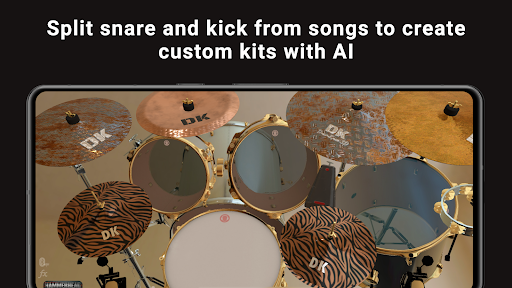
The visual design of DrumKnee 3D Drums is striking, showcasing a modern 3D interface that brings the drum set to life. The app features various stylish skins that users can choose from, lending a personalized touch to their drumming experience. The graphics are vibrant and detailed, making the app visually appealing and engaging. The screenshots depict a polished layout with realistic drum elements, including cymbals that are chokable, allowing for dynamic performance capabilities.
Gameplay is intuitive, with a very low latency response that ensures a seamless connection between the user's tap and the sound produced. This level of responsiveness is particularly impressive and crucial for drummers, as it mimics the real-life experience of playing a drum set. The overall user interface is straightforward, making it easy for users to navigate through the various features and options available. The incorporation of a virtual foot pedal is especially innovative, as it allows for a hands-free experience while drumming.
Key Features
- Realistic Drumming Experience: Professionally recorded sounds create an authentic drumming environment.
- Innovative Foot Pedal: Users can trigger the bass drum sound using their foot, enhancing the realism.
- Custom Drum Kits: Users can mix and match sounds to create personalized drum sets.
- Recording and Sharing: Performances can be recorded and shared with the DrumKnee community.
- Chokable Cymbals: Cymbals can be choked by holding a finger on them, adding further realism to performances.
- Play Along with Drumless Tracks: Users can play along with select songs that lack drum tracks, providing a unique challenge.
- Stylish Skins: Multiple skins available for customization, allowing users to personalize their interface.
- DK Music Subscription: A separate monthly fee allows users to download drumless tracks directly to the app for enhanced playability.
Mod Features
While DrumKnee 3D Drums is a feature-rich application, users often seek additional benefits that can enhance their experience further. Here are some plausible mod features that could be included in a hypothetical version of the app:
- Premium Unlocked: Access all premium features and content without any restrictions.
- No Ads: Enjoy an uninterrupted drumming experience without any advertisements.
- Unlimited Money: Use unlimited in-app currency to purchase skins, sound packs, and other enhancements.
- Exclusive Sound Packs: Access to unique drum sounds and kits not available in the standard version of the app.
- Enhanced Recording Features: Advanced recording options, including multi-track recording and mixing capabilities.
How to Install APK on Android
Installing the DrumKnee 3D Drums APK file on your Android device is a straightforward process. Follow these steps to get started:
- Enable Unknown Sources: Before downloading the APK, go to your device's Settings > Security > Unknown Sources and toggle it on. This allows you to install apps from sources other than the Google Play Store.
- Download the APK: Visit the official download link here to download the DrumKnee 3D Drums APK file directly to your device.
- Locate the APK: Once the download is complete, navigate to your device's Downloads folder to find the APK file.
- Install the APK: Tap on the APK file to begin the installation process. Follow the on-screen instructions to complete the installation.
- Launch the App: Once the installation is complete, you can find the DrumKnee 3D Drums app in your app drawer. Open it and start drumming!
Conclusion
DrumKnee 3D Drums - Drum Set is an exceptional app for drumming enthusiasts who want a realistic and immersive experience on the go. With its innovative features, stunning graphics, and user-friendly interface, it provides a comprehensive platform for both beginners and advanced drummers. The unique foot pedal functionality adds an extra layer of realism that is hard to find in other drumming apps. Whether you are looking to practice, record, or simply enjoy playing drums, DrumKnee is a fantastic choice.
Ready to unleash your inner drummer? Download DrumKnee 3D Drums - Drum Set now and start your musical journey!